
What is Litsy? It’s a wonderful, new-ish social media platform all about books: reviews, reading challenges and games, giveaways, etc. I recommend it to readers and authors, because it’s high interaction and relatively easy to gain a following. To get a feel for how high and how easy, keep reading.
In 2017, I started the #LitsyTips hashtag, and a bunch of Littens (yes, we call ourselves Littens) chimed in. This post is a cumulation of those tips, and in them, you’ll learn how to gain a following and interaction quickly. P.S. If you are a current Litten who follows back new users, add your @handle in the comments so that readers of this post know who to add to get started.
Litsy is available on the Internet and as an app on the iOS and Android operating systems. I’ll be your iPhone/iOS expert for this post (@raimeygallant), and Trish (@TrishB) and Julia (@julesG) will be your Android OS experts. Throughout these tips, they weigh in whenever there’s a difference in how Android functions as opposed to iOS. Thanks for being here, Trish and Julia. “Thanks for having us.” (They didn’t really say that.)
Without further ado, here are your #LitsyTips:
Tip 1: Litsy doesn’t rank posts by popularity. It’s chronological, so the more followers you have, the more interaction you’ll get.
Tip 2: Interaction on Litsy is less about the hashtags than Bookstagram/Instagram (with a few exceptions, more on that below), and more about how many followers you have.
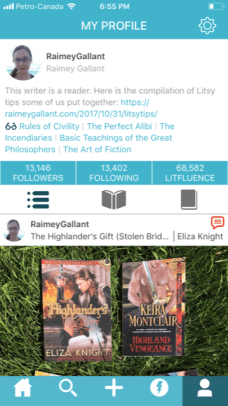 Tip 3: My current follower-to-following ratio is 1:2. Approximately 50 percent of people followed me back (still true as of Dec 2018.) Don’t be afraid of users not following you back. You need to add people to gain a following. Litsy has a relatively high follow-back rate at the moment as compared to other sites, so the time to gain a following on Litsy is now. As with every social media site, follow-back rates decline over time, and we can expect this to be true of Litsy as well. I explain below how my strategy was to only follow recently active users.
Tip 4: Start by adding people who post regularly and who have at least a couple hundred followers. Then you want to scroll through your recent home feed, and click into their likes. Add the people who have liked a post within the past few hours. These users are recently active and most likely to follow you back. Pretty soon, you’ll be following people who have 100+ likes on their posts. Especially click into their recent posts and follow the “likers.”
Tip 5: Another strategy for finding followers likely to follow you back is to click into the followers of recently active users with a fair amount of them. If you see in your home feed someone got 50 likes, for instance, click into their profile, click into their followers, and add anyone you’re not yet following from the top of that list, which is chronological by who followed them most recently.
Tip 6: As of December 2018, the “Follow Suggested Users” option has been revamped, and seems to be really effective. Per Litsy, “The new [feature] is full of fresh, active members you’ll want to follow. It’s partially personalized according to what you read. And it’s new every day.” I’ve watched what happens when new users follow all 150 people on this list, and the follow-back rate is high. I’ve also noticed that new users who follow all 150 tend to get a lot of welcome messages if they get their first post up right away. Access the feature by pressing the home icon at the bottom of the screen and then pressing the icon of a human with a plus sign beside her.
Tip 7: As far as I’m aware, unlike other social media sites, Litsy hasn’t implemented any follow or interaction limits yet. You could technically add 1,000 people today using the follow method I describe in earlier tips, and have somewhere close to 500 followers within the week.
Tip 8: Try to return likes and comments as much as possible. This is a two-way street of encouragement. This is probably the most important part. Litsy is about interaction. You are likely to get a lot more followers if you interact (comment, like) people’s posts regularly. (Julia) I think this is the most important, if you never write comments or join in conversation then you won’t get the most out of the site. (Trish)
Tip 9: Do you have to post everyday? No. Some people do. Unlike other social media sites, where if you stop posting for a period, the platform will stop ranking your posts higher in their algorithm, Litsy is democratically chronological, which I love. You can post as often or as seldom as you like, but this said, you’ll get to know the community more, the more often you post. You’ll be more recognizable.
Tip 10: Litsy allows you to post three different types of posts: Reviews, Quotes, and Blurbs. I found the term blurbs confusing at first, because a blurb can mean a book summary in some circles. Litsy means blurb in a different way. Basically, you can post anything you want in a blurb: your mood, a shout-out to another user, a contest, anything. It doesn’t mean book summary, but you could do that too. It’s a catch-all term for posts that are “book-adjacent,” such as: “Check out this awesome cake I baked while audiobooking Michelle Obama’s Becoming!”
Tip 11: If you are giving away the ending, every type of post from tip 10 lets you select the spoiler alert option. The only problem with using this is that it hides the content of your post, and people have to click on the option to view the content should they wish to. This reduces the amount of interaction the post receives. A workaround is to post nothing revealing in the main post, but after you do post it, go and add a spoiler comment to your post. To do this, choose the skull and crossbones icon before hitting send. Lo and behold, now everyone can view your main post, and the spoiler is hidden in a comment for those who wish to read it. It’s a good idea to point out in your main post that there’s a spoiler in the comments, because the comment thread only shows the most current.
Tip 12: Don’t feel like you have to spend a lot of time on images, because Littens are pretty relaxed about that aspect of the site. My cats end up in a lot of my photos, and I love seeing what everyone is eating-while-reading. Some people take pictures while audiowalking (audiobooking while walking.) I sometimes use screenshots of the book cover, which is fair use (according to me, but I’m not a lawyer), because I’m promoting the book. You can also snap a photo of the cover or page you’re reading on your e-reader, or you can snap a shot of something random. Generally speaking, the people who create images for Litsy games or events WANT you to steal and share their image, so center their image and use the screenshot function on your phone. Litsy will help you crop it to your liking when you re-upload it. There is no re-share function, so to re-share/boost a post, the only option is to screenshot an image and share it from scratch. The crop option on Android can be awful and lose half your picture. I use an app called square sized and then upload that to Litsy – it keeps the whole picture, then. (Trish)
Tip 13: If you don’t know how something works on Litsy or what the etiquette is, ask someone in their comments.
Tip 14: There’s now an assortment of Litsy social media icons you can use on your website in order to provide a link for visitors to quickly link to your Litsy profile. At the moment these icons are only in .png format. I’ll update this when vector logos are made available.
Tip 15: On the app on your phone, long-hold any comment and then choose reply. This automatically tags the person you’re replying to without having to search and tag them manually. On the web version, hold your cursor over the comment, and a drop-down arrow for replying will appear.
Tip 16: If you are curious about a book, click the book title if you see it in your home feed, or search by author or title. There is usually a back cover summary at the top. Then scroll down to see all the reviews and blurbs about that book in reverse chronological order.
Tip 17: Near the bottom of every post in your home feed, you’ll see an icon of a stack of books. Click this to add the book to one of your three stacks: To Read, Am Reading, Have Read. You can also rate/review the book here if you’ve read it. On your profile page, below your followers, there’s a bar with 3 options. You can toggle between your feed of posts, your stack of To-Reads, and your stack of Have-Reads/Bailed by, in the app version, using the bar below your followers, or in the web version, using the bar below your profile. It’s useful to keep this up-to-date if you’re going to take part in any book swaps/postal exchanges. (Trish)
Tip 18: If you want to add all the books you’ve ever read to your stack, it’s easiest to use the search icon, and search by author or title, then add each book. To import your books from Goodreads, follow the instructions here.
Tip 19: You don’t have to tag someone in a reply to their own post, but if they commented on your post, you need to tag them, or they won’t see it.
Tip 20: You can edit any of your posts or comments, even if they’re made in reply to someone else’s post. To edit your post, click the ellipsis at the bottom of your post. To edit a comment on your post or someone else’s, click the comment if you can see it, or if you can’t because there are more comments hiding the one you want to edit, click near the bottom of the post where it says ‘comments’, then scroll to your comment and click on it. You can’t edit comments on Android. You can only “Delete” it, “Mark as Spoiler” or “Cancel”. (Julia)
Tip 21: The lightning-bolt icon on the bottom bar is your notifications (top bar in the web version.) This is where you can see chronologically who has added you, liked your posts, added books from your posts to their stacks, and who has commented on your posts or tagged you. This is what I scroll through to return likes and comments (as much as I possibly can.) While iOS and the web version separate comments from other activity with tabs, Android doesn’t have this feature.
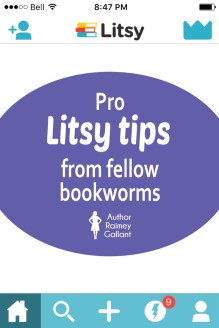 Tip 22: At the bottom of each post, there’s an arrow icon, which can be used to retrieve a link for that post to send it in a message or post it on another social media site.
Tip 23: Follow @LitsyHappenings for upcoming events, and tag this user if you want a repost of your own Litsy event. You can also search the #LitsyHappenings hashtag. Other accounts that share info about events include @LitsySwaps @LitsyPenPals @LitsyGetsGraphic and @LitsyBuddyRead.
Tip 24: When you first join Litsy, and you don’t have a lot of followers yet, look out for Litsy games (one of the hashtag exceptions I was talking about.) There are reading bingos, this-or-that or get-to-know-you questions, and month-long photo challenges, among others. If you see a game, but can’t figure out how it works, ask the person playing, and they’ll explain. Use the game’s hashtag, so other players can find you and interact with you. The photo challenges are great fun. I always try to do several at the same time. Checking the hashtag is also a way to find new people to follow, who might follow you back. (Julia)
Tip 25: When playing the monthly photo challenge games, no, you don’t have to post every day, just as often as you want. You’ll get more interaction if you use both the game hashtag as well as that day’s hashtag by simply turning that day’s theme into a hashtag verbatim. For instance, if on the third day of the month, the theme is ‘Wind and Fire’, the hashtag would be #WindAndFire.
Tip 26: Several users run successful, real-world interaction events in the form of meetups or partnering users as pen pals or for book swaps/exchanges. These are super fun, so look out for them and sign up! These are brilliant – but have costs associated so don’t blow the bank by signing up to 4 running at the same time! (Trish)
Tip 27: Many users run successful and fun read-a-thons, read-a-longs, and audiobook fitness challenges. Look out for these hashtags, because there’s no better way to get through lotsa pages than when 50+ Littens are cheering you on.
Tip 28: Can you start your own Litsy event or game? Yes. The more followers you have, and the more well-thought-out your game is, the more likely you are to be successful. Be warned however that a lot of people are running events and games already, and so some of the game/event types may not fare as well if the environment gets too cluttered.
Tip 29: If you recommend a friend join Litsy, give them your handle so they can add you, and tell them to post something right away. Once they post, you can add the #LitsyWelcomeWagon hashtag in their post’s comments, and don’t forget to tell them to visit @LitsyWelcomeWagon to find a link to these tips as well as to a series of Listy how-to videos by @chelleo. Adding the welcome wagon hashtag will increase the likelihood that the new Litten will receive visits from volunteer welcomers. And in one of your own posts, you can tag your friend and ask your followers to follow them and go comment on their page.
Tip 30: Be part of the #LitsyWelcomeWagon. Visit the hashtag, where you can add your own quick welcome message to the accounts of new Littens.
Tip 31: To follow back peeps who have followed you (and please do!), there are two methods: 1) Check your notifications. Users you’re already following will have, beside their name, a triangle on the app or a check mark on the web. Users you’re not yet following will have, beside their name, a plus sign you can easily click on to follow them back. 2) On your profile page, click into your followers to find those you’re not yet following back.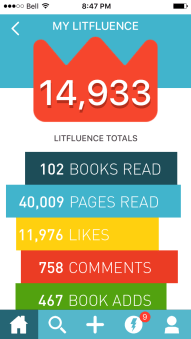
Tip 32: You’ll be astounded at how fast some Littens plow through books. Don’t think there’s something wrong with you because you don’t seem to read as fast as other users. Everyone has their own pace and non-literary commitments. Also, some of us Littens are big into audiobooks, so it’s possible we’re listening to a lot of our TBR. Reading is not a competitor sport, so don’t worry. Further, you are not obliged to buy all the books you see posted about. Do not strain your bank account unnecessarily, get a library card instead. (Julia)
Tip 33: We are Littens, and we’re kinda proud of it. I think it’s because it sounds like kittens, and those who have pets love to share pictures of their reading buddies, especially using the #CatsOfLitsy and #DogsOfLitsy hashtags.
Tip 34: Litsy gets easier as you use it. As with any new-to-you social media site, it may seem overwhelming at first, but once you have ten or so posts under your belt, you’ll get the hang of it.
Tip 35: Your ‘Litfluence’ is a tabulation of how influential you are on Litsy (as pictured.) We Littens joke about being under the ‘litfluence,’ because we’re constantly reading reviews that make us want to reach for our credit card.
Tip 36: Because upcoming, self-published, and non-English books are not always available in Litsy’s database, you can add books via this form. The form won’t work if the book’s ISBN is already in the database under a different name.
Tip 37: When using Litsy on the web, you can old-fashioned scroll or use the J or K keys to jump to the next post.
Tip 38: If you want to see a feed of what other Littens are saying about books you’ve added to your stacks, look at or follow @PostsAboutYourBooks.
Tip 39: When searching under books, you can either tag a book or a bookstore.
 Julia aka @julesG: Reading is my super power. I read every day and visit Litsy every day. Littens are my people: they understand why I have several copies of the same book and still buy another copy just because the cover is slightly different. Join us. We are a very fun crowd.
 Trish aka @TrishB: Been on Litsy for over a year now after seeing it referenced on Bookriot – had to wait as it was initially only on iOS. So happy when it went to Android too. Avid reader (obviously), love the people and the community on Litsy.
Have you joined Litsy yet? Are you considering? Remember to add your handle in the comments if you plan to follow people back.

 Raimey Gallant
I follow back on Litsy, and you can add me at @raimeygallant 🙂
LikeLiked by 1 person
Wow! That was helpful and full of good insight👍🏻👍🏻
Im pretty active on Litsy and still learned a few tricks, just now😊
I follow back as well @cinfhen on Litsy
LikeLiked by 2 people
Thanks for stopping by, Cindy!
LikeLike
I follow back everyone. Mine is @mangokittty
LikeLiked by 2 people
It’s so nice to find out what everyone’s real names are. I instinctively think of you as mangokitty. 😛
LikeLike
I agree…I like to know the “real” first name of everyone. 🙂
LikeLiked by 1 person
Thanks for putting this together! 💕 I follow back @CoffeeCatsBooks
LikeLiked by 2 people
My pleasure!
LikeLike
Great blog and love your pseudonym! I’m Jess, I follow back and am on @jhod
LikeLiked by 2 people
Thanks so much!
LikeLike
Great tips! Thanks for sharing 🙂
LikeLiked by 2 people
My pleasure! Heading over to your blog now. 🙂
LikeLiked by 1 person
Hello! I’m Michela and I follow back!
LikeLiked by 2 people
I’m @astroneman
LikeLiked by 1 person
Another favourite Litten of mine. 🙂
LikeLike
I’ve been on Litsy forever and learned new tips! Great job! @lissa00
LikeLiked by 2 people
So happy it was helpful!
LikeLike
I didn’t even know that this social media site existed. Thanks for sharing all your tips about it.
LikeLiked by 2 people
My pleasure. If you ever join, let me know so I can shout you out and get people to welcome/follow you. 🙂
LikeLike
Okay, I don’t blog often but I blog. Read your post and I’ve joined. Noticed that it didn’t#t accept my picture. Does it have to be a particular size. And where do I find you. I didn’t find any followers outside of William Morrow and a couple of others who were on the first page.
By the way, thanks for the info.
Shalom aleichem,
Pat G @ EverythingMustChange
LikeLiked by 1 person
Yea! You joined! I looked for you, but didn’t know what name to search under, so you’ll have to let me know what your handle is so I can shout you out on the app. I’m not sure about the picture. I don’t think it needs to be a specific size, but it may need to be relatively small. I’ll leave a comment on your blog in case you don’t read this.
LikeLike
Can’t find you. 😦
LikeLiked by 1 person
Wow! That’s an amazing follow back rate. I love all these tips too. Thank you 🙂
LikeLiked by 1 person
It’s my pleasure. Let me know if you join, Erika, and I’ll shout you out to people, which is a really great way to get started with a following. 🙂
LikeLiked by 1 person
I didn’t know a thing about it until now. Another social site might do me in, but if it’s available on the phone, I might check it. Especially now that I know how to do it right.
LikeLiked by 1 person
If you do ever decide to join, let me know so I can shout you out, and the #LitsyWelcomeWagon will do it’s thing. 🙂
LikeLike
I’ve been on Litsy over a year and learned several things from this! Thanks! I also love how diverse Litsy has become. It’s my favorite social media site. I’m @Laura317 on Litsy.
LikeLiked by 2 people
Yea! We’re winning Litsy!
LikeLike
I am following you, Laura317.
LikeLike
This was a really thorough post. Thank you for putting this together! I always follow people back, @perksofbeingabookworm
See you on Litsy,
Abbie
LikeLiked by 2 people
Thanks for stopping by, Abbie!
LikeLike
I had never heard of Litsy so will have to check it out. Great post will need to come back and reread. Juneta @ Writer’s Gambit
LikeLiked by 1 person
Yea! I hope you join, and let me know if you do. 🙂
LikeLike
Never heard of Litsy. I’ll have to look into it, but not sure I can handle another social media site right now.
thanks for the tips.
LikeLiked by 2 people
I know the feeling!
LikeLike
This is wonderful. I have been a member of Litsy for a year. I am @Suelizbeth on Litsy and I always follow back.
LikeLiked by 2 people
Awesome!
LikeLike
I’ve never heard of Litsy before. I will check it out now, though and come back & re-read this when I need to figure out what to do with it!
LikeLiked by 2 people
Yea!
LikeLike
I just started using Instagram on my phone (as DLP, not me personally) so I might be able to tackle Litsy. Thank you for all of the tips.
LikeLiked by 1 person
My pleasure. 🙂
LikeLike
How interesting. I’ve never heard of Litsy. One problem which is really only me: I sit at my computer all day so prefer to do all my social media that way. One the phone–not so much. It’s holding me back from Instagram because I keep forgetting to update my account.
Still, the writer format is quite appealing.
LikeLiked by 1 person
It’s definitely more of a reader format, but there are opportunities for writers, there’s no doubt. 🙂 Let me know if you sign up. I’ve got nothing happening on Instagram yet. 🙂
LikeLike
Wow. I had no idea about this platform. I love Instagram, so I will definitely check this out. Thanks for the awesome tips!
LikeLiked by 2 people
I just joined @ChrysFey
LikeLiked by 1 person
I hope you’re enjoying it!
LikeLike
I need to get a better phone so I can use all this new technology. Thanks for all this info, Raimey!
LikeLiked by 3 people
My pleasure!
LikeLike
Awesome post, Raimey. I’ve been in Litsy for a while, but haven’t really got into the nuts and bolts of how to use it. Thanks for the great tips!
LikeLike
So happy you found this helpful, Iola!
LikeLike
I’m @BookNAround and I follow back too.
LikeLiked by 3 people
Yea!
LikeLike
Unfortunately, I don’t have the technology to join this yet, but it sounds like fun.
LikeLiked by 3 people
If you ever do join, let me know so I can shout you out to the Litsy community. 🙂
LikeLike
Reblogged this on The Biblioanthropologist.
LikeLiked by 2 people
Thanks so much, Aislynn! Going to check it out now!
LikeLike
Or apparently I already did, haha.
LikeLike
Great tips! I adore Litsy 😍
LikeLiked by 3 people
Thank you for this article Raimey. You’ve inspired me to join Litsy! @Elizabeth_Chatsworth.
LikeLiked by 2 people
Hope you’re enjoying it!
LikeLike
Great article…I’m so tech challenged, it took me the best part of an hour just to work out how to copy the link on an iPhone! I’m @Leonie_Kelsall. I think!!
LikeLiked by 4 people
Thanks, Leonie!
LikeLike
Thanks for the tips! @umbrellagirl is my account. Feel free to follow.
LikeLiked by 2 people
Awesome!
LikeLike
May I ask what the difference between “books read” and “book adds” is?
LikeLiked by 2 people
I should go and clarify that. th Thanks for pointing this out. A book add is what you would like to read in the future, and a book read is just that. 🙂
LikeLiked by 1 person
Have been on Litsy for about a year & a half now & had no idea there were Litsy tips — these are great! Thanks!
Follow me @Coleen
LikeLiked by 2 people
So happy you like them!
LikeLike
Have been on litsy over a year. I follow back everyone.
@readingover50
LikeLiked by 4 people
Thanks for stopping by!
LikeLike
Okay, this is a new to me platform and I’m trying to join from my phone now.
LikeLiked by 2 people
I joined @Nas or @NasDean…I can’t get how to get my username yet 🙂 but followed everyone from here.
LikeLiked by 1 person
I hope it’s all working out for you!
LikeLike
I can’t find you. 🙂
LikeLiked by 1 person
She’s @nas
LikeLike
Are you Nas Dean? It still didn’t come up by itself.
LikeLike
I follow back! @riotmom
LikeLiked by 2 people
Thanks for stopping by, Erin!
LikeLike
Great tips! I follow back. I’m @cobwebmoth on Litsy.
LikeLiked by 2 people
I don’t think I’ll ever be able to think of you as Laura. Cobwebmoth is all I see. 😉
LikeLike
Love this post! I’ve been using LItsy for a few months now and it’s a great community! I still love reading the tips too! I always try to follow back as much as possible 🙂 @FantasyChick
LikeLiked by 2 people
Thanks, Vanessa!
LikeLike
I’m @jfalkens on Litsy 😊
LikeLiked by 1 person
Awesome! Thanks for stopping by. 🙂
LikeLike
I follow back! Add me: @fang88
LikeLiked by 2 people
Great tips!!! Follow me I will follow you!! @Book_in_hands
LikeLiked by 2 people
What a wonderful post. THANK YOU.
I joined Litsy in July and love it. I am @silversreviews
I feel the Litsy Community is more friendly than Instagram. I always get more feedback on Litsy. I love how the feedback is divided into Activities and Conversations.
I also love that links are clickable on Litsy. 🙂
I like the events…I am taking part in #JingleShelves. A lot of fun, and I am meeting other members and getting book ideas.
Thanks again for this wonderful post. I am going to re-read all of the tips for things I may have missed.
Elizabeth
LikeLiked by 1 person
Thanks, Elizabeth. 🙂 I think I’m following both your blogs now.
LikeLike
I see you are…thanks.
The Blogspot one is the more active one.
LikeLike
Oooo…I see it. 🙂 🙂
LikeLiked by 1 person
Thanks for the great tips. Add me: @vincereads
LikeLiked by 2 people
Hello I’m fairly new on Litsy so I’m trying to follow more people / get more followers…. I am @squirrelbrain….
LikeLiked by 2 people
Hi, I’m new here and will happily follow back 🙂 I’m @DiannaHardy Thanks for the very warm welcome! Xx
LikeLiked by 2 people
I always follow back! I’m @sprainedbrain on Litsy. 😃
LikeLiked by 2 people
So weird to think if I ever met you in person, I’d have to call you Jenni. I’m so used to sprainedbrain. 🙂
LikeLike
LOL…that would be funny to have to call people by their real name. 🙂
LikeLike
Hello! I’m super new to Litsy and am trying to learn my way around. This post was very helpful! My name is Ingrid but you can find me as @Ingerella. It’s nice to meet you!
LikeLiked by 2 people
I’m happy the post is helpful. 🙂
LikeLike
Wow!!! That was super informative! Thank you for
all of the great info! I’m new to Litsy so it was extremely helpful! I’m Jolena, if you follow me @jolena_75 I’ll follow back.
Thanks,
Jolena 😀
LikeLiked by 2 people
I’m stalking you now. 😉
LikeLike